Onramp Integration
Try the demo at https://demo.peer.xyz. This flow requires the Peer extension and is only available on desktop.
Integrate the ZKP2P onramp directly into your application by using the Peer extension deeplink flow. Use the Peer extension SDK wrapper (peerExtensionSdk.onramp() from @zkp2p/sdk) to request a connection and open the onramp in the extension side panel. With a single call, you can offer your users fast onchain onboarding, complete with:
- Multiple payment platforms (Venmo, Revolut, Wise, Cash App and many more)
- Supported blockchains (Base, Solana, Ethereum, Polygon, Hyperliquid, Arbitrum and 20+ chains)
- Supported assets (USDC, SOL, ETH, USDT, etc.)
- Gasless transactions
0.4.9+ breaking changeThese docs target Peer extension manifest version 0.4.9 and later.
callbackUrlwas removed frompeerExtensionSdk.onramp()onProofComplete()was removed from the extension SDKonIntentFulfilled()is now the page callback to listen for completed onramp fulfillment
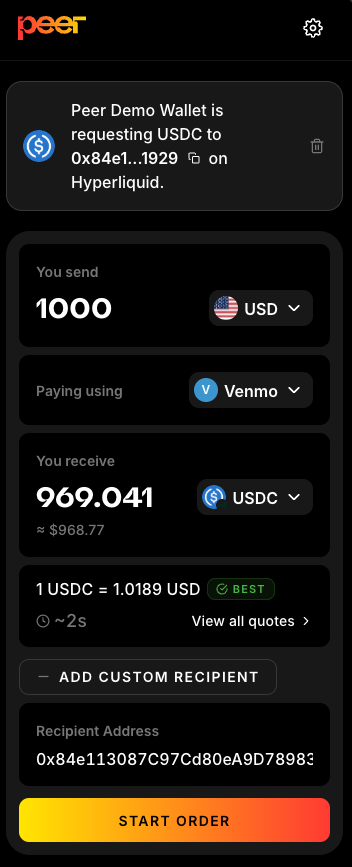
Onramp modal shown in the Peer side panel
Quickstart
Integration is simple:
- Install
@zkp2p/sdkand importpeerExtensionSdk. - Check extension state. If it is not installed, call
peerExtensionSdk.openInstallPage()to open the Chrome Web Store. - Then request a connection with
peerExtensionSdk.requestConnection(). - Register
peerExtensionSdk.onIntentFulfilled()before opening the flow. - Build your deeplink params object.
- Call
peerExtensionSdk.onramp()to open the side panel.
import { peerExtensionSdk } from '@zkp2p/sdk';

const state = await peerExtensionSdk.getState();
if (state === 'needs_install') {
  peerExtensionSdk.openInstallPage();
  throw new Error('Peer extension not installed');
}

if (state === 'needs_connection') {
  const approved = await peerExtensionSdk.requestConnection();
  if (!approved) {
    throw new Error('Peer connection not approved');
  }
}

const unsubscribe = peerExtensionSdk.onIntentFulfilled((result) => {
  console.log('Peer order fulfilled:', result.intentHash, result.bridge.status);
});

peerExtensionSdk.onramp({
  referrer: 'Rampy Pay',
  referrerLogo: 'https://demo.peer.xyz/Rampy_logo.svg',
  inputCurrency: 'USD',
  inputAmount: '10',
  paymentPlatform: 'venmo',
  toToken: '8453:0x0000000000000000000000000000000000000000',
  recipientAddress: '0x84e113087C97Cd80eA9D78983D4B8Ff61ECa1929',
});

// Call unsubscribe() when your page no longer needs the listener.
Peer Extension SDK API
The extension wrapper exports a default instance plus helpers if you want to inject a custom window (useful for testing or iframes).
import {
  peerExtensionSdk,
  createPeerExtensionSdk,
  isPeerExtensionAvailable,
  getPeerExtensionState,
  openPeerExtensionInstallPage,
  PEER_EXTENSION_CHROME_URL,
} from '@zkp2p/sdk';
Instances
peerExtensionSdk: Default SDK instance that uses the globalwindow.createPeerExtensionSdk(options?: PeerExtensionSdkOptions): Create a scoped SDK instance (supportsoptions.window).
Methods on PeerExtensionSdk
isAvailable(): boolean- True if the extension is detected on the provided window.getState(): Promise<'needs_install' | 'needs_connection' | 'ready'>- Convenience check for install/connection state.requestConnection(): Promise<boolean>- Prompts the user to connect the extension.checkConnectionStatus(): Promise<'connected' | 'disconnected' | 'pending'>- Reads the current connection status.openSidebar(route: string): void- Opens the Peer side panel to a specific route.onramp(params?: PeerExtensionOnrampParams): void- Opens the onramp flow with the provided params.onIntentFulfilled(callback: PeerIntentFulfilledCallback): () => void- Subscribe to onramp fulfillment events. Returns an unsubscribe function.getVersion(): Promise<string>- Returns the extension version.openInstallPage(): void- Opens the Chrome Web Store listing for the Peer extension.
Helper functions and constants
isPeerExtensionAvailable(options?: PeerExtensionSdkOptions): boolean- Utility for availability checks.getPeerExtensionState(options?: PeerExtensionSdkOptions): Promise<PeerExtensionState>- Utility for install/connection state.openPeerExtensionInstallPage(options?: PeerExtensionSdkOptions): void- Opens the Chrome Web Store listing.PEER_EXTENSION_CHROME_URL- The Chrome Web Store URL for the Peer extension.
Onramp Parameters
Pass these parameters as an object to peerExtensionSdk.onramp(). The SDK builds and validates the query string for you.
| Parameter | Description | Type | Example |
|---|---|---|---|
referrer | (Recommended) Your application name shown in the extension | String | referrer=Rampy |
referrerLogo | (Recommended) Your application logo. Must be an http or https URL. | String | referrerLogo=https://<logo-link> |
inputCurrency | (Optional) Input currency user wants to swap. Defaults to the user's local currency when available, otherwise USD. | String | inputCurrency=USD |
inputAmount | (Optional) Amount of input currency the user wants to swap | String or number (up to 6 decimal places) | inputAmount=12.34 |
paymentPlatform | (Optional) Preferred payment platform for the initial quote. Required for exact-deposit handoffs. | String | paymentPlatform=venmo |
depositId | (Optional) Exact maker deposit selected by the source page. Use a string or bigint for large ids. | String, number, or bigint | depositId=12345678901234567890 |
amountUsdc | (Optional) Base USDC amount in raw 6-decimal units (1000000 = 1 USDC). Used for exact-output and exact-deposit handoffs. | String, number, or bigint | amountUsdc=1000000 |
toToken | (Optional) Output token the user will onramp to | String (Has to be in the format explained below) | toToken=8453:0x0000000000000000000000000000000000000000 |
recipientAddress | (Optional) Address to which the output tokens will be sent. Defaults to the connected extension wallet when omitted. | String | recipientAddress=0xf39...66 |
intentHash | (Optional) Existing intent hash to reopen directly in the send-payment step. Must be a 0x-prefixed 32-byte hex string. | String | intentHash=0xabc...123 |
Only pass depositId as the public exact-order constraint. Do not pass escrowAddress, paymentMethodHash, or hashedOnchainId through the onramp URL. The extension uses SDK/backend escrow defaults, and it derives the payment method hash from paymentPlatform.
Completion Callback
Register peerExtensionSdk.onIntentFulfilled() before calling peerExtensionSdk.onramp().
const unsubscribe = peerExtensionSdk.onIntentFulfilled((result) => {
  if (result.bridge.status === 'not_required') {
    console.log('Funds delivered to destination wallet');
    return;
  }

  console.log('Fulfill complete, bridge pending:', result.bridge.trackingUrl);
});
The callback payload looks like this:
type PeerIntentFulfilledResult = {
  intentHash: `0x${string}`;
  status: 'fulfilled';
  fulfillTxHash: `0x${string}`;
  recipientAddress: string | null;
  destinationToken: string | null;
  bridge: {
    required: boolean;
    status: 'not_required' | 'pending' | 'completed';
    trackingUrl?: string | null;
    txHashes?: Array<{ txHash: `0x${string}`; chainId: number }>;
    outputAmount?: string | null;
    expectedOutputAmount?: string | null;
  };
};
Current callback semantics:
- Non-bridge orders emit once with
bridge.status = 'not_required' - Bridge orders emit once after fulfill succeeds with
bridge.status = 'pending' - Bridge orders emit again after destination bridge completion with
bridge.status = 'completed' - The callback is delivered only to the tab that originally called
onramp()
To Token
The toToken parameter specifies the destination chain and token in a single string, using the format:
chainId:tokenAddress
- chainId — The numeric Chain ID of the target network, below is the current list of supported chains.
| Chain | chainID |
|---|---|
| Base | 8453 |
| Solana | 792703809 |
| Polygon | 137 |
| BNB | 56 |
| Avalanche | 43114 |
| FlowEVM | 747 |
| Arbitrum | 42161 |
| HyperEVM | 999 |
| Hyperliquid | 1337 |
| Scroll | 534352 |
| Ethereum | 1 |
-
tokenAddress — The on‑chain token address:
- For EVM chains, include the full 0x‑prefixed address (use the zero address
0x0000…0000for native currency). - For non‑EVM chains (e.g. Solana), use the native token's base‑58 address.
- For EVM chains, include the full 0x‑prefixed address (use the zero address
-
Base ETH:
8453:0x0000000000000000000000000000000000000000 -
Solana SOL:
792703809:11111111111111111111111111111111 -
Ethereum Mainnet ETH:
1:0x0000000000000000000000000000000000000000 -
Avalanche USDC:
43114:0xb97ef9ef8734c71904d8002f8b6bc66dd9c48a6e -
Hyperliquid USDC:
1337:0x0000000000000000000000000000000000000000
Examples
Onramp to Base ETH
peerExtensionSdk.onramp({
  referrer: 'Rampy Pay',
  referrerLogo: 'https://demo.peer.xyz/Rampy_logo.svg',
  toToken: '8453:0x0000000000000000000000000000000000000000',
  recipientAddress: '0x84e113087C97Cd80eA9D78983D4B8Ff61ECa1929',
});
Onramp 10 USD to Solana
peerExtensionSdk.onramp({
  referrer: 'Rampy Pay',
  referrerLogo: 'https://demo.peer.xyz/Rampy_logo.svg',
  inputCurrency: 'USD',
  inputAmount: '10',
  toToken: '792703809:11111111111111111111111111111111',
  recipientAddress: '<insert-sol-address>',
});
Onramp 10 EUR via Revolut to Mainnet ETH
Payment platform is not enforced. After opening the onramp in the side panel, the user can choose a different payment platform to complete the flow.
peerExtensionSdk.onramp({
  referrer: 'Rampy Pay',
  referrerLogo: 'https://demo.peer.xyz/Rampy_logo.svg',
  inputCurrency: 'EUR',
  inputAmount: '10',
  paymentPlatform: 'revolut',
  toToken: '1:0x0000000000000000000000000000000000000000',
  recipientAddress: '0x84e113087C97Cd80eA9D78983D4B8Ff61ECa1929',
});
Onramp Exact USDC Amount
Onramp exactly 1 USDC on Base to a recipient address. Users can choose their preferred currency and payment method. The best available quote is fetched and displayed so the user can complete the order.
amountUsdcis denominated in Base USDC raw units, even whentoTokenis a non-Base-USDC destination token.- If
toTokenpoints to another token or chain, the extension usesamountUsdcas the Base USDC source amount and keeps the bridge quote/execution path active. recipientAddressis recommended. When omitted, the extension defaults to the connected extension wallet.
peerExtensionSdk.onramp({
  referrer: 'Rampy Pay',
  referrerLogo: 'https://demo.peer.xyz/Rampy_logo.svg',
  amountUsdc: '1000000',
  recipientAddress: '0x84e113087C97Cd80eA9D78983D4B8Ff61ECa1929',
});
Onramp an Exact Liquidity Deposit
Use this when your app already knows the maker deposit and amount the user selected, such as a liquidity page handing off an exact order into the extension.
peerExtensionSdk.onramp({
  referrer: 'Liquidity Page',
  referrerLogo: 'https://app.peer.xyz/logo.svg',
  inputCurrency: 'USD',
  inputAmount: '500',
  paymentPlatform: 'venmo',
  depositId: '12345678901234567890',
  amountUsdc: '488280000',
  toToken: '8453:0x833589fCD6eDb6E08f4c7C32D4f71b54bdA02913',
  recipientAddress: '0x84e113087C97Cd80eA9D78983D4B8Ff61ECa1929',
});
Exact-deposit semantics:
depositIdscopes the extension quote to the maker deposit the user selected.amountUsdcis the selected Base USDC receive amount in raw 6-decimal units.inputAmountis the fiat amount the user pays for that selected deposit.paymentPlatformidentifies the payment platform and is used to derive the payment method hash.- If
toTokenis not Base USDC, the selected Base USDC amount remains the source amount and Relay prices the destination output.
Always serialize exact deposit ids as strings unless the value is known to be within JavaScript's safe integer range. Deposit ids are protocol identifiers and must remain lossless from the page URL through quote matching.
Migrating From Pre-0.4.9
If your integration was built against the older extension contract:
- Remove
callbackUrlfrom everypeerExtensionSdk.onramp({...})call - Replace
onProofComplete(...)withonIntentFulfilled(...) - Register the callback before calling
onramp() - If you were waiting for a redirect back to your page, keep the user on-page and update state from
onIntentFulfilled(...)instead
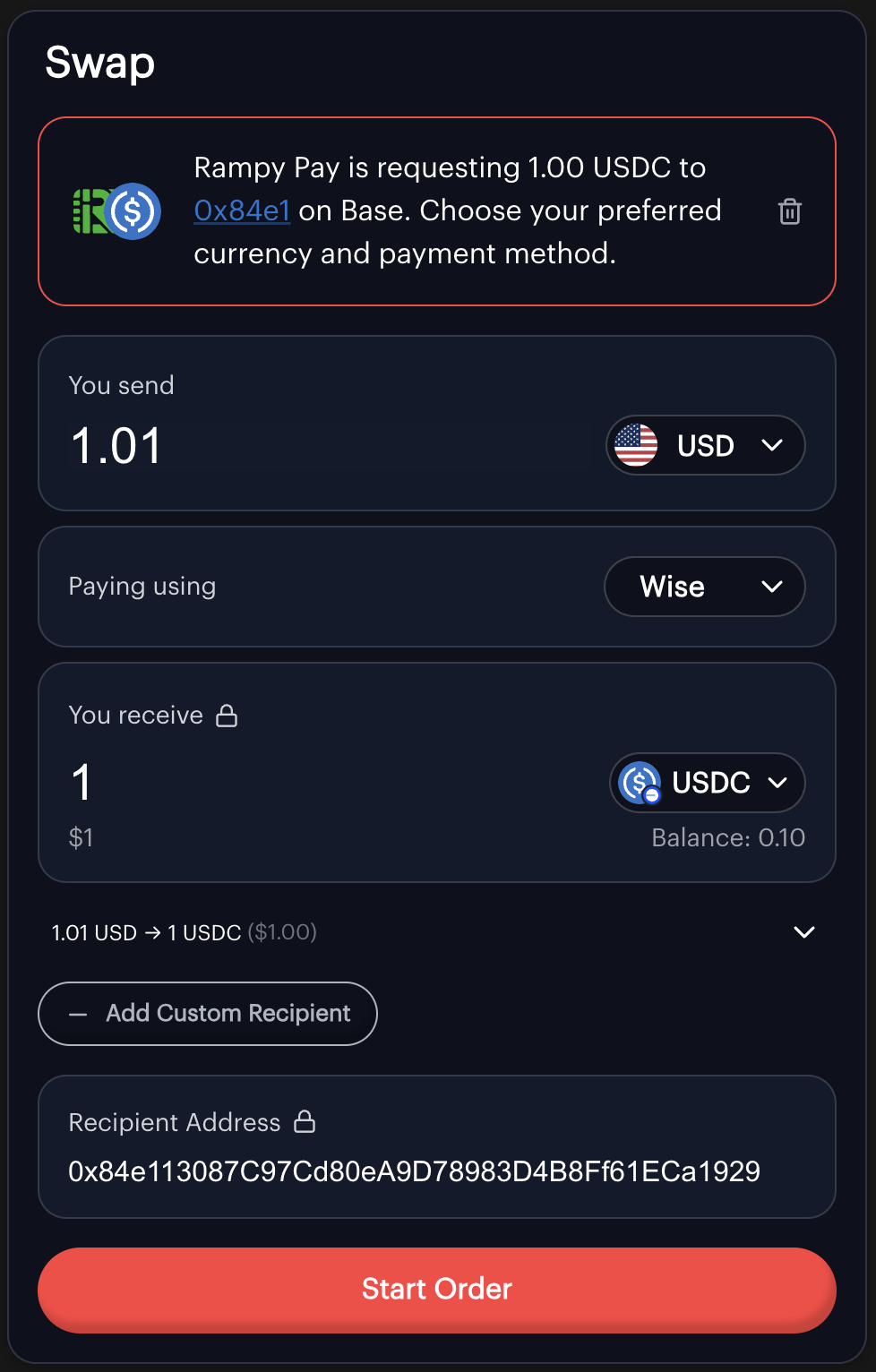
Request instructions shown in the Peer side panel
LLM Integration Prompt
Download a ready-to-paste prompt for AI coding assistants (Claude, Cursor, Copilot, etc.) that adds a Peer onramp button to your site's payment flow:
Help?
For any issues or support, please join our Discord.